Getting Started
What’s On This Page
Overview
The 3porter plugin brings the power of AI content generation to your WordPress website. We will show you how easy it is to get up and running with the 3porter features in only a few minutes!
With your 3porter membership, you can install and activate the plugin on as many websites as you want – all using the same account. Let’s get started!
Requirements
To start using the 3porter plugin, you will need the following:
- A WordPress website. We recommend using the latest version of WordPress, but 3porter can work with most any recent version of WordPress.
- A 3porter membership. Get started for free with a trial membership. Sign up here!
- The 3porter plugin. After signing up, you will be provided a link to download the 3porter plugin. Install and activate the 3porter plugin on your website and you’ll be ready to start generating content!
Setup
After completing the items found in the “Requirements” section above, follow these steps to set up the 3porter plugin:
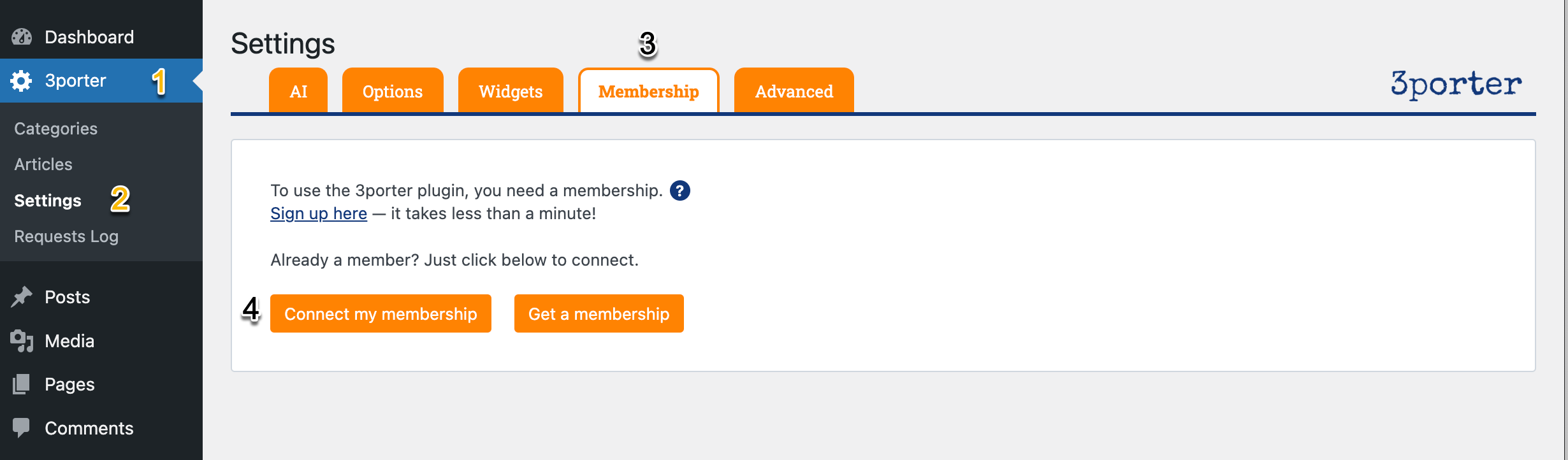
- From the WordPress admin area, find the 3porter plugin menu, and then click on “Settings”. Refer to screenshot below.
- Click on “Connect my membership”.
- Enter the username and password that you used to sign up for your 3porter membership. Then, click on “Authorize”.
Using the Plugin
After completing the steps in the “Setup” section above, use the following instructions to begin generating content.
Populate Categories and Subcategories
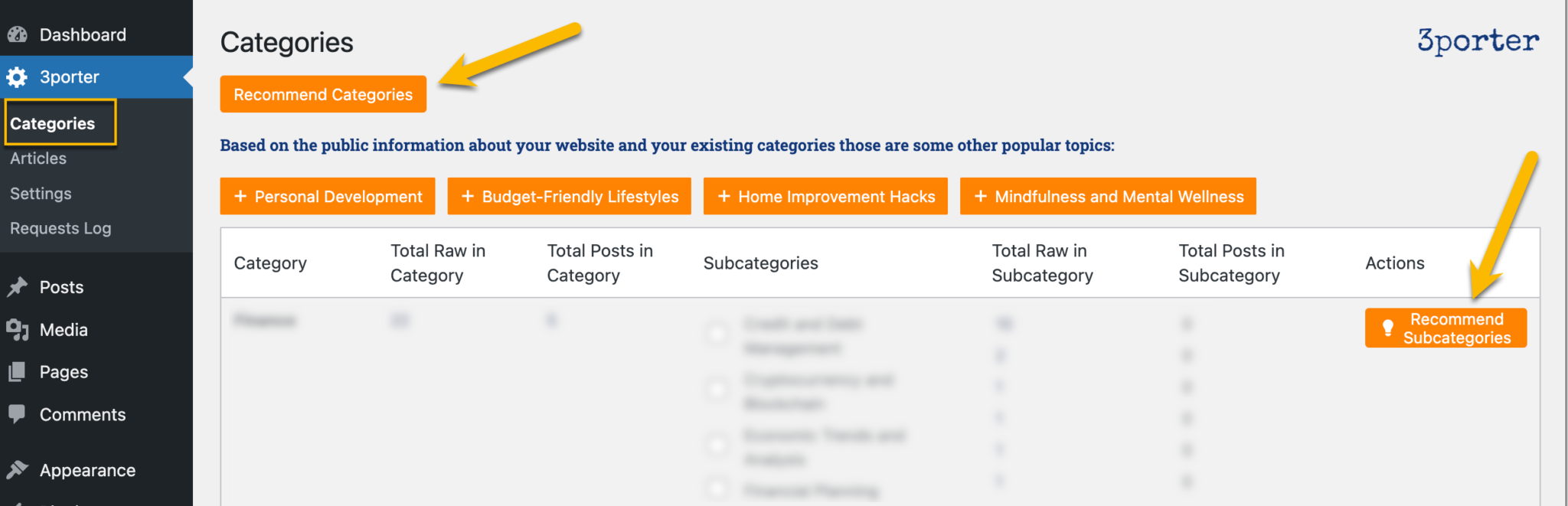
Click on 3porter > Categories to view the categories that exist for your WordPress posts.
If your website does not have any categories, click on the “Recommend Categories” button from 3porter > Categories. (Alternatively, create categories manually from Posts > Categories.)
After you have at least one top-level category, you need to create subcategories.
Again, if your website does not have any subcategories, click on the “Recommend Subcategories” button next to any top-level category from 3porter > Categories. (Alternatively, create subcategories manually from Posts > Categories.)
NOTE: Any categories or subcategories you create in 3porter will also be available in Posts > Categories. Conversely, any categories you created in Posts > Categories will also be listed in 3porter > Categories.
Create Your First Content
With only 3 clicks, you can generate new content for your website! Here’s how…- Navigate to 3porter > Categories.
- Place a check in the checkbox next to any subcategory.
- Click on “Generate Content for Selected Categories”.
- You will be automatically redirected to the “Content” area of the 3porter plugin, where you will see the new content being generated with real-time status updates.
- After the content is finished being generated, you are provided options to review the new content or create a WordPress post using the new content.
Schedule Automated Content Generation
This is a very powerful feature of the 3porter plugin! This feature allows you to set up a schedule that will automatially generate content for any subcategory as frequently as you want. You can even have it immediately publish the content as a new post! Here’s how…- Navigate to 3porter > Scheduler